
Write Arabic text in a PDF in C#
Write a right to left paragraph with an embedded Arabic font, numbers and currency included.
Short answer
Section titled “Short answer”Load a font that covers Arabic with PdfOpenTypeFont.Load, put the text in a PdfParagraph with
Direction = PdfTextDirection.RightToLeft, and draw it with DrawText. Letters join and take their
contextual forms, and the text carries ActualText, so it copies and searches in logical order.
#:package PdfNetStack@1.2.0using PdfNetStack;using PdfNetStack.Drawing;using PdfNetStack.Fonts;
PdfFont arabic = PdfOpenTypeFont.Load("fonts/NotoSansArabic-Regular.woff2");   // embedded as a subsetPdfFont latin = PdfOpenTypeFont.Load("fonts/Inter-Regular.woff2");var style = new PdfTextStyle(arabic, 20) { Fallbacks = [latin] };               // digits and the euro sign
PdfDocument doc = PdfDocument.Create();PdfPage page = doc.Pages.Add(PdfRectangle.A4);using (PdfGraphics g = page.CreateGraphics()){    var paragraph = new PdfParagraph { Direction = PdfTextDirection.RightToLeft, LineHeight = 1.6 }        .Add("المبلغ المستحق: 1,250.00 € خلال ثلاثين يوما من تاريخ الفاتورة.", style);    g.DrawText(paragraph, 60, 60, page.Width - 120);   // top left corner and width}doc.Save("arabic.pdf");
Console.WriteLine(PdfDocument.Open("arabic.pdf").Pages[0].ExtractText());   // logical order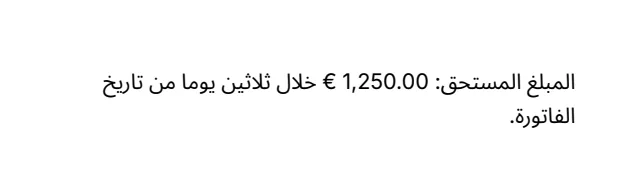
- The font is embedded as a subset of the glyphs drawn. TrueType, OpenType, WOFF and WOFF2 files load the same way.
- A font that lacks some characters, such as Latin letters, digits or the euro sign, borrows them
from the fonts in
Fallbackson thePdfTextStyle, as the sample does with Inter. - Numbers keep their left to right order inside the right to left line, as the Unicode bidirectional algorithm places them.
doc.Viewer.RightToLeft = truetells viewers the document reads right to left, which sets the order of pages shown side by side.