
Digitally sign PDF files in C# and .NET
Sign a PDF with a certificate, add a visible signature box, timestamp it, add the data that keeps it verifiable for years, and validate every signature a file carries.
Short answer
Section titled “Short answer”Call PdfSigner.Sign with the PDF bytes and an X509Certificate2 that has a private key. It
appends a PAdES B-B signature in an incremental update and returns the signed file.
PdfSigner.Verify lists every signature with what held and what did not.
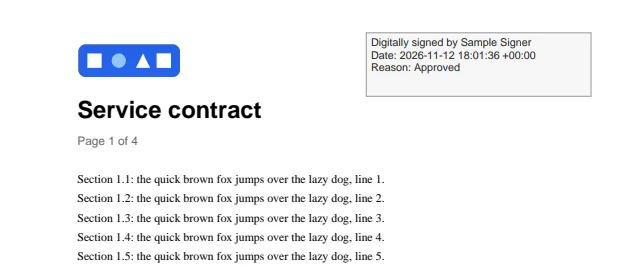
byte[] signed = PdfSigner.Sign(File.ReadAllBytes("contract.pdf"), cert, new PdfSignatureOptions{ Reason = "Approved", Location = "Brussels", // A visible box on page 1: x and y from the top left of the page, in points. Appearance = new PdfSignatureAppearance(PageIndex: 0, X: 340, Y: 30, Width: 210, Height: 60),});File.WriteAllBytes("contract-signed.pdf", signed);The certificate can come from a .pfx file, the Windows certificate store, or a smart card through
its provider: anything X509Certificate2 can reach with a private key. The sample creates a
throwaway self-signed certificate so it runs anywhere.
| Level | What it adds | How |
|---|---|---|
| B-B | The signature, with the signing certificate | PdfSigner.Sign |
| B-T | A trusted time: an RFC 3161 timestamp on the signature | PdfSignatureOptions.Timestamp |
| B-LT | Certificates, OCSP responses and CRLs in the document security store | PdfSigner.AddValidationData |
| B-LTA | A document timestamp over the whole file, including that data | PdfSigner.AddDocumentTimestamp |
What a signature contains
Section titled “What a signature contains”- A CAdES detached CMS signature (
ETSI.CAdES.detached) with the ESS signing certificate v2 attribute, as PAdES baseline B-B requires. - A digest of SHA-256 (the default), SHA-384 or SHA-512, and an RSA or ECDSA key.
- The signing time, reason, location and contact information you pass, in the signature dictionary.
- Intermediate certificates from
Chain, so validators can build the path to a trusted root.
The CMS structure is encoded by the library. No package beyond .NET is needed, and OpenSSL verifies the result.
Options
Section titled “Options”PdfSignatureOptions | Default | Notes |
|---|---|---|
Reason, Location, ContactInfo | null | Written to the signature dictionary |
FieldName | null | The signature field’s name; null picks Signature1, Signature2 and so on |
Digest | Sha256 | Sha384 and Sha512 are also available |
Chain | empty | Intermediate certificates to embed |
Appearance | null | A visible box; null signs invisibly |
SigningTime | now | The time recorded in the signature dictionary, not a trusted timestamp |
Timestamp | null | A PdfTimestampClient: adds an RFC 3161 signature timestamp (PAdES B-T) |
A visible signature
Section titled “A visible signature”PdfSignatureAppearance places a box on a page. PageIndex is zero based, and X, Y,
Width and Height are in points from the top left of the page, as for
drawing. By default the box shows “Digitally signed by”, the signer’s name, the
date and the reason. Text replaces that text and Font changes the font (Helvetica by default;
use an embedded font in a PDF/A document).
Verify signatures
Section titled “Verify signatures”foreach (PdfSignatureInfo s in PdfSigner.Verify(File.ReadAllBytes("contract-signed.pdf"))){ Console.WriteLine($"{s.FieldName}: {s.SignerName}, {s.SubFilter}"); Console.WriteLine($" intact {s.IsIntact}, whole file {s.CoversWholeDocument}, problem {s.Problem ?? "none"}");}For each signature field with a value, Verify checks that the byte range excludes exactly the
signature’s own contents, that the signed bytes still hash to the signed digest, and that the
signature verifies with the certificate’s public key.
PdfSignatureInfo | Meaning |
|---|---|
IsIntact | The signed content is intact and the signature is cryptographically valid |
DigestMatches, SignatureValid | The two checks behind IsIntact |
CoversWholeDocument | Nothing was appended after this signature |
Problem | Why verification failed, or null |
SignerName, Certificate | The signer’s common name and certificate |
Validation | With PdfValidationOptions: the chain, validity, key usage and revocation checks, see below |
Timestamp | The signature timestamp, or null |
IsDocumentTimestamp | This entry is a document timestamp rather than a signature |
FieldName, SubFilter, Reason, Location, SigningTime | What the signature dictionary says |
Change one signed byte and the signature no longer holds:
byte[] tampered = (byte[])signed.Clone();int at = Array.LastIndexOf(tampered, (byte)'%'); // a byte inside the signed range, near the endtampered[at] = (byte)'#';PdfSignatureInfo check = PdfSigner.Verify(tampered)[0];Console.WriteLine($"Tampered: intact {check.IsIntact}, digest matches {check.DigestMatches}");Timestamps and long term validation
Section titled “Timestamps and long term validation”A plain signature says who signed, but not when in a way others can rely on, and it stops being checkable once the signer’s certificate expires or the revocation services go away. The PAdES levels above B-B address both.
The library makes no network calls. PdfTimestampClient builds each RFC 3161 request (the hash,
a random nonce, an optional policy) and checks the reply: its status, the hash, the nonce, the
token’s signature, and a certificate marked for time stamping. Your code sends the request,
usually as an HTTP POST, and returns the reply.
// The library builds the RFC 3161 request and checks the reply; your code carries the bytes.// Use the address of the time stamping authority you have an agreement with.var tsa = new PdfTimestampClient(request =>{    using var content = new ByteArrayContent(request);    content.Headers.ContentType = new MediaTypeHeaderValue("application/timestamp-query");    using HttpResponseMessage reply = http.Send(new HttpRequestMessage(HttpMethod.Post, "https://tsa.example.com/") { Content = content });    reply.EnsureSuccessStatusCode();    return reply.Content.ReadAsByteArrayAsync().GetAwaiter().GetResult();});
// PAdES B-T: the signature carries a timestamp from the authority.byte[] pdf = PdfSigner.Sign(File.ReadAllBytes("contract.pdf"), signer, new PdfSignatureOptions{    Reason = "Approved",    Chain = chain,    Timestamp = tsa,});
PdfSigner.AddValidationData writes the document security store (DSS): the certificate chains
of every signature and timestamp, the OCSP responses and CRLs your IPdfRevocationSource
returns, and a VRI entry per signature, in an incremental update. AddDocumentTimestamp then
adds a /DocTimeStamp over the whole file.
// PAdES B-LT: certificates, OCSP responses and CRLs go into the document security store, in an// incremental update, so the signature can be checked after the certificates expire.pdf = PdfSigner.AddValidationData(pdf, new HttpRevocationSource(http), chain);
// PAdES B-LTA: a document timestamp over everything, renewed before its own certificate expires.pdf = PdfSigner.AddDocumentTimestamp(pdf, tsa);File.WriteAllBytes("contract-lta.pdf", pdf);
The revocation source gets one PdfRevocationRequest per certificate, with its issuer, the OCSP
and CRL addresses the certificate lists, and a ready OCSP request. Return what you have, or
PdfRevocationValues.None.
// Fetches OCSP responses and CRLs from the addresses each certificate lists.sealed class HttpRevocationSource(HttpClient http) : IPdfRevocationSource{ public PdfRevocationValues GetRevocationValues(PdfRevocationRequest request) { var ocsp = new List<byte[]>(); var crls = new List<byte[]>(); foreach (string url in request.OcspUrls) { using var content = new ByteArrayContent(request.CreateOcspRequest()); content.Headers.ContentType = new MediaTypeHeaderValue("application/ocsp-request"); using HttpResponseMessage reply = http.Send(new HttpRequestMessage(HttpMethod.Post, url) { Content = content }); if (reply.IsSuccessStatusCode) ocsp.Add(reply.Content.ReadAsByteArrayAsync().GetAwaiter().GetResult()); } if (ocsp.Count == 0) { foreach (string url in request.CrlUrls) { crls.Add(http.GetByteArrayAsync(url).GetAwaiter().GetResult()); } } return new PdfRevocationValues { OcspResponses = ocsp, Crls = crls }; }}Only revocation data that matches the certificate and is signed by its issuer, or by a responder the issuer delegated, is kept. Delta and partitioned CRLs are not used.
PdfTimestampClient options: Digest (SHA-256 by default), PolicyOid (null for the
authority’s default), and ReservedSize, the bytes reserved in the PDF for a token (12288 by
default, enough for a token that carries the authority’s chain; signing fails after the request
when a token is larger).
This sample needs a time stamping authority and revocation services, so CI compiles it without running it. CI runs the library’s own tests of every level against a local test authority.
Validate against your trust anchors
Section titled “Validate against your trust anchors”PdfSigner.Verify(pdf, options) goes further than the integrity checks: it builds each
certificate chain up to the trust anchors you supply and checks every certificate in it.
var options = new PdfValidationOptions{ TrustAnchors = [root], // the roots you trust CheckRevocation = false, // no OCSP or CRL data in this sample};foreach (PdfSignatureInfo s in PdfSigner.Verify(signed, options)){ PdfCertificateValidation v = s.Validation!; Console.WriteLine($"{s.FieldName}: intact {s.IsIntact}, certificates {v.Status}, chain {v.Chain}, at {v.TimeSource} time"); foreach (PdfCertificateCheck c in v.Certificates) { Console.WriteLine($" {c.Certificate.GetNameInfo(X509NameType.SimpleName, false)}: validity {c.Validity}, " + $"key usage {c.KeyUsage}, revocation {c.Revocation}{(c.IsTrustAnchor ? ", trust anchor" : "")}"); }}For each certificate, PdfCertificateCheck reports the validity period, the key usage (signer,
CA with its path length, time stamp authority) and revocation, each as Passed, Failed,
Indeterminate or NotChecked, with the reason. PdfCertificateValidation.Status sums them up,
Chain tells whether the chain reaches a trust anchor, and Problems lists what went wrong.
Certificates are checked at the time of a valid timestamp when its authority validates,
otherwise now, or at ValidationTime when you set it. TimeSource says which.
Revocation comes from the document security store and from RevocationSource, with OCSP
freshness checks and delegated responders. Without revocation data the result is
indeterminate, not passed:
// With revocation checks on and no revocation data, the result is indeterminate, not passed.PdfCertificateValidation strict = PdfSigner.Verify(signed, new PdfValidationOptions { TrustAnchors = [root] })[0].Validation!;Console.WriteLine($"With revocation checks: {strict.Status}");foreach (string problem in strict.Problems) Console.WriteLine($" {problem}");PdfValidationOptions | Default | Notes |
|---|---|---|
TrustAnchors | empty | The roots you trust. With none, chains are built but not judged |
Certificates | empty | Extra certificates, such as intermediate CAs, for building chains |
CheckRevocation | true | Check every certificate below the trust anchor |
UseDocumentSecurityStore | true | Use the certificates, OCSP responses and CRLs the file carries |
RevocationSource | null | Revocation data beyond the document security store |
ValidationTime | null | The time to check at; null for a valid timestamp’s time, else now |
PdfSignatureInfo.Timestamp describes a signature’s timestamp (its time, authority, whether its
imprint matches, and its own validation), and document timestamps appear in the list with
IsDocumentTimestamp set.
Several signatures
Section titled “Several signatures”Each signature is appended in its own incremental update that matches the file’s cross-reference
style, so earlier signatures stay valid. After a second signature, the first one reports
IsIntact true and CoversWholeDocument false: it is valid for the revision it signed, and
something was added after it.
// A second signature goes into a new incremental update; the first one stays valid.byte[] twice = PdfSigner.Sign(signed, cert, new PdfSignatureOptions{ Reason = "Countersigned", Digest = PdfDigestAlgorithm.Sha384,});File.WriteAllBytes("contract-countersigned.pdf", twice);foreach (PdfSignatureInfo s in PdfSigner.Verify(twice)){ Console.WriteLine($"{s.FieldName}: intact {s.IsIntact}, whole file {s.CoversWholeDocument}");}To prepare an empty signature field for someone else to sign, see
Forms. PdfSigner.Sign adds a new field of its own each time.
Signed documents elsewhere in PdfNetStack
Section titled “Signed documents elsewhere in PdfNetStack”- Editing a signed document with
PdfDocumentand saving it in full invalidates its signatures.SaveIncrementalappends the changes after the signed bytes instead, so they stay intact, see Large files. - The optimizer never rewrites a signed file: it returns the input unchanged.
- Sign last: create, fill, convert or archive the document first, then sign the saved bytes.
Limits
Section titled “Limits”- Validation covers chains, validity, key usage and revocation. Full ETSI EN 319 102-1 validation (certificate policies, name constraints, qualified status) is on the roadmap.
- Delta and partitioned CRLs are not used.
- The library makes no network calls: timestamps and revocation data come through your code.
SigningTimeis the time the signer’s software recorded. Only a timestamp gives a trusted time.- Encrypted documents cannot be signed:
SignthrowsNotSupportedException.
Related
Section titled “Related”- PDF/A: archive first, then sign
- Forms: signature fields
- Encryption
- API: PdfSigner, PdfSignatureOptions, PdfTimestampClient, IPdfRevocationSource, PdfValidationOptions, PdfCertificateValidation, PdfSignatureInfo
Questions
- Which signature levels does PdfNetStack write?
- PAdES baseline B-B, B-T with an RFC 3161 signature timestamp, B-LT with certificates, OCSP responses and CRLs in the document security store, and B-LTA with a document timestamp. Each step is an incremental update.
- Does signing need another package?
- No. The CMS structure is encoded by the library itself, on top of the .NET cryptography classes.
- Does PdfSigner.Verify check that the certificate is trusted?
- With PdfValidationOptions it builds the chain to the trust anchors you supply and checks validity, key usage and revocation. Without options it checks the byte range, the digest and the signature, and returns the certificate for your own decision.
- Does the library call a time stamping authority or an OCSP responder itself?
- No. The library makes no network calls. It builds the requests and checks the replies; your application sends the bytes, so it decides which services to use and how.