
Fonts, images and resources in HTML to PDF
Style sheets, images and fonts load through one rule: data: URIs and files under the base
folder, and nothing else unless your code says so.
Short answer
Section titled “Short answer”Convert a file with ConvertFileToDocument, or set BaseUri to the folder that holds the assets,
and relative URLs in <link>, <img>, url() and @font-face resolve there. Fonts come from
@font-face, then the Fonts collection you pass, then installed fonts; the generic families map
to the standard PDF fonts. To load from the web, pass a ResourceLoader that decides per address.
string folder = Path.GetFullPath(".") + Path.DirectorySeparatorChar;var options = new HtmlConverterOptions{ BaseUri = new Uri(folder), // fonts/, photo.jpg, logo.png and photo.webp resolve here UseSystemFonts = false, // only @font-face and the standard 14 fonts ResourceLoader = uri => { // With a loader, every address comes here: decide per address, null means "do not load". if (uri.IsFile) return Path.GetFullPath(uri.LocalPath).StartsWith(folder) ? File.ReadAllBytes(uri.LocalPath) : null; if (uri.Host != "assets.example.com") return null; return remote.TryGetValue(uri.AbsoluteUri, out string? css) ? Encoding.UTF8.GetBytes(css) : null; },};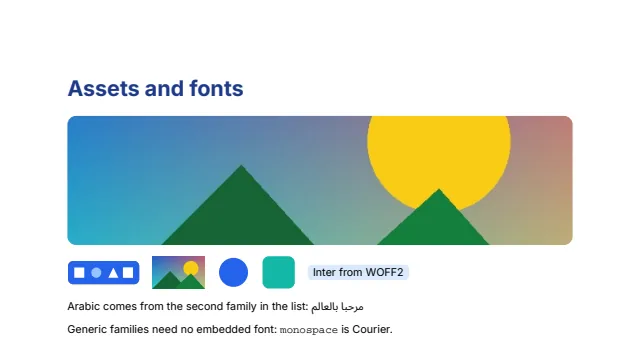
Where resources come from
Section titled “Where resources come from”| Setup | What loads |
|---|---|
No BaseUri, no loader (ConvertToPdf and ConvertToDocument defaults) | data: URIs only |
ConvertFileToDocument(path) | data: URIs, and files in the HTML file’s folder and below |
BaseUri set to a folder | data: URIs, and files in that folder and below, after resolving any .. |
ResourceLoader set | data: URIs, and whatever the loader returns for each absolute URL |
With a loader, every URL that is not a data: URI goes to it, files included, so the loader
decides for local files too. Return null for anything that must not load; the document is laid
out without it. Keep the default for untrusted HTML: converting it then cannot reach internal
services or read files elsewhere on the machine. A single resource larger than 64 MiB is not
loaded.
@import and <link rel="stylesheet"> load style sheets the same way, as UTF-8 unless a byte
order mark says otherwise.
Web fonts
Section titled “Web fonts”<style> @font-face { font-family: Inter; src: url(fonts/Inter-Regular.woff2) format("woff2") } @font-face { font-family: Inter; font-weight: 700; src: url(fonts/Inter-Bold.woff2) format("woff2") } @font-face { font-family: "Noto Sans Arabic"; src: url(fonts/NotoSansArabic-Regular.woff2) } body { font-family: Inter, "Noto Sans Arabic", sans-serif; font-size: 10pt }</style>srctakes TrueType, OpenType, WOFF and WOFF2 files, andlocal()names an installed font or one from theFontscollection. Sources are tried in order; a damaged file is skipped for the next one.font-weighttakes one weight or a range, andfont-styleitalic or oblique. The face whose style and weight match best is used, as CSS matches them.- Only the glyphs the document draws are embedded, as a subset.
How a font is chosen
Section titled “How a font is chosen”For each family in font-family, in order:
@font-facerules of the document.- The
Fontsoption, aPdfFontCollectionyou fill from files or folders. - Installed fonts, unless
UseSystemFontsis false.
The generic families map to the 14 standard PDF fonts, which need no embedding: serif (also
cursive, fantasy and math) to Times, sans-serif and system-ui to Helvetica, and
monospace to Courier. Common families that are not found, such as Arial, Roboto, Times New
Roman or Consolas, fall back to the standard font with the same role. A document with no font
named at all uses Times, as browsers default to serif.
Characters the chosen font lacks come from the next family in the list that has them, so
Inter, "Noto Sans Arabic" sets Latin text in Inter and Arabic in Noto Sans Arabic. With
UseSystemFonts on, installed fonts with wide coverage, such as Segoe UI, Noto Sans and DejaVu
Sans, back up any character still missing.
For output that is identical on every machine, such as on a build server or in a container, set
UseSystemFonts = false and ship the fonts with the application, in @font-face or in Fonts.
See Fonts and text for the font engine itself.
Images
Section titled “Images”<img class="photo" src="photo.jpg" alt="Landscape photograph"><img src="logo.png" alt="Logo" width="90"><img src="photo.webp" alt="The photograph as WebP" width="64"><svg width="40" height="40" viewBox="0 0 40 40"><circle cx="20" cy="20" r="18" fill="#2563eb"/></svg>| Format | Notes |
|---|---|
| JPEG | Embedded as is, without recompression |
| PNG | Every color type and bit depth, interlaced or not, transparency kept |
| GIF | The first frame, with its transparent color |
| SVG | Drawn as PDF vectors, sharp at any zoom, without filters, masks or patterns. Works in <img>, in CSS backgrounds and inline as <svg> |
| BMP | 1 to 32 bits per pixel, with alpha |
| TIFF | The first page; fax and JPEG strips, LZW, Deflate and PackBits, 1 to 16 bit samples |
| WebP | Lossy and lossless, with alpha, the first frame of an animation |
Images work in <img>, background-image, list-style-image and content: url(). Each image is
written once per document however often it appears. Intrinsic sizes follow the pixel density a
raster image records, else 96 pixels per inch. object-fit and object-position place an image
in its box.
Data URIs
Section titled “Data URIs”data: URIs work everywhere a URL does, base64 or percent encoded, so a template can carry its
images and fonts inside the HTML and need no files at all:
<img src="data:image/svg+xml,%3Csvg xmlns='http://www.w3.org/2000/svg' width='40' height='40'%3E%3Crect width='40' height='40' rx='8' fill='%2314b8a6'/%3E%3C/svg%3E" alt="">Limits
Section titled “Limits”- SVG filters, masks and patterns are not drawn.
- A resource larger than 64 MiB is not loaded.
- With
UseSystemFontsoff, text needs a supplied font that covers its characters: the standard 14 fonts cover Western and Central European languages only.
Related
Section titled “Related”Questions
- Does HTML to PDF download resources from the internet?
- Not by default. Without a ResourceLoader only data URIs and files under the base folder load. A loader you supply decides, address by address, what is fetched.
- Which font formats work with @font-face?
- TrueType, OpenType, WOFF and WOFF2. Only the glyphs a document uses are embedded.