
Page headers, footers and numbers in HTML
PdfNetStack.Html splits a document into pages with the CSS paged media rules: page size and margins, headers and footers in the margins, page numbers and breaks.
Short answer
Section titled “Short answer”Write an @page rule with a size, margins and margin boxes. counter(page) and counter(pages)
give the page number and the page count, string() and element() carry text or whole elements
from the document into the margins, and break-before, break-after and break-inside control
where pages end.
@page { size: A4; margin: 22mm 18mm 24mm; @bottom-center { content: "Page " counter(page) " of " counter(pages); font-size: 8pt }}The PageStyle option sets a size and margins that apply before the document’s own @page
rules; its default is size: A4; margin: 2cm.
A complete report
Section titled “A complete report”This style sheet drives a four page report: a chapter title in the top left margin, a running element in the top right, alternating footers on left and right pages, a table that continues over two pages with its header repeated, a landscape annex and a watermark on every page.
const string Css = """    @page {      size: A4;      margin: 22mm 18mm 24mm;      font-family: sans-serif;      @top-left { content: string(chapter); font-size: 8pt; color: #64748b }      @top-right { content: element(brand) }      @bottom-center { content: "Page " counter(page) " of " counter(pages); font-size: 8pt }    }    @page :first { @top-left { content: none } }    @page :left { @bottom-left { content: "Quarterly report"; font-size: 8pt; color: #64748b } }    @page :right { @bottom-right { content: "Quarterly report"; font-size: 8pt; color: #64748b } }    @page wide { size: A4 landscape }
    body { font-family: sans-serif; font-size: 10pt }    .brand { position: running(brand); text-align: right; font-size: 8pt; font-weight: bold; color: #1e3a8a }    .draft { position: fixed; z-index: -1; top: 110mm; left: 25mm; font-size: 90pt;             color: #e0e7ff; transform: rotate(-30deg) }
    h1 { string-set: chapter content(text); color: #1e3a8a }    .chapter + .chapter { break-before: page }    .annex { page: wide }    h2 { break-after: avoid }    p { orphans: 3; widows: 3 }
    table { width: 100%; border-collapse: collapse; font-size: 9pt }    thead th { background: #1e3a8a; color: white; text-align: left; padding: 4pt 6pt }    td { padding: 3pt 6pt; border-bottom: 0.5pt solid #cbd5e1 }    tr { break-inside: avoid }    """;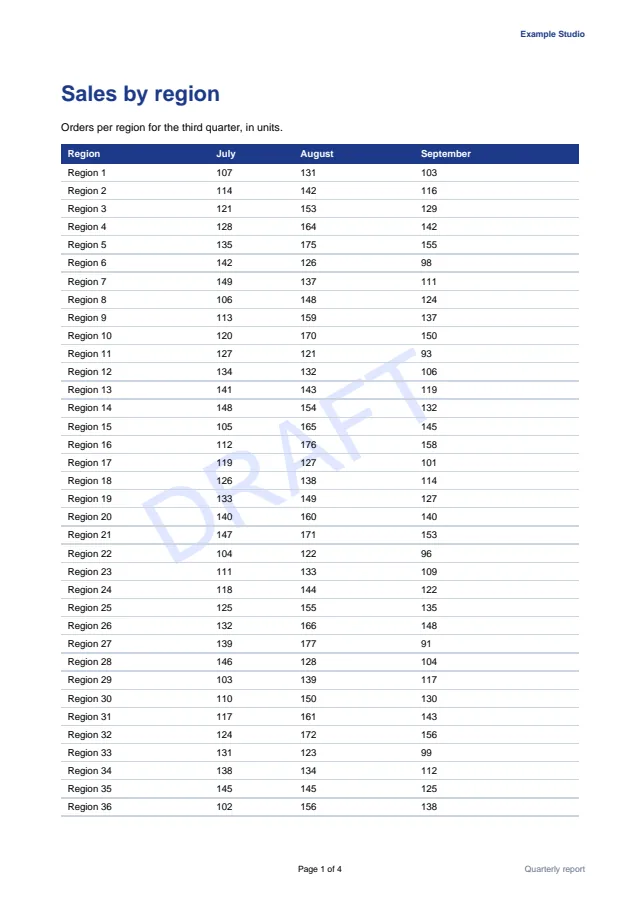
Page size and margins
Section titled “Page size and margins”size takes a length pair or a named size, optionally with landscape or portrait. Named
sizes are A5, A4, A3, B5, B4, JIS-B5, JIS-B4, letter, legal and ledger.
margin works as on any box. Properties set on @page apply to its margin boxes, so a
font-family there sets the font of every header and footer.
Margin boxes
Section titled “Margin boxes”The sixteen margin boxes of CSS Paged Media sit around the page area: @top-left-corner,
@top-left, @top-center, @top-right, @top-right-corner, the same four along the bottom,
and @left-top, @left-middle, @left-bottom, @right-top, @right-middle and
@right-bottom on the sides. Each takes content and the usual text and box properties.
The boxes along one side share it. A center box alone takes the whole side, and beside others a third. Without a center box, a left or right box alone takes the whole side and two take half each, so a single running header spans the page.
First, left and right pages
Section titled “First, left and right pages”@page :first { @top-left { content: none } }@page :left { @bottom-left { content: "Quarterly report"; font-size: 8pt; color: #64748b } }@page :right { @bottom-right { content: "Quarterly report"; font-size: 8pt; color: #64748b } }:first matches the first page. In a left to right document the first page is a right page, so
:right matches odd pages and :left even ones; a right to left document swaps them. A page
rule with a pseudo-class outweighs one without, and a named page rule outweighs both.
Page numbers
Section titled “Page numbers”counter(page) is the current page number and counter(pages) the total. Both take a counter
style, such as counter(page, lower-roman). They work in margin boxes, in running elements and in
generated content in the body.
Named pages
Section titled “Named pages”A named page gives a section its own page type, and the section is laid out at that page’s width:
@page wide { size: A4 landscape }.annex { page: wide }A change of page name forces a page break, and the content after it is laid out at its own page
type’s width. The page property works on any block in the block flow, nested or not: in the
report above, the annex section sits inside another div. A box that spans the break is sliced,
its top edge before the break and its bottom edge after. Inside a flex, grid or table container
page has no effect, and the container stays on one page type.
Running headers from the document
Section titled “Running headers from the document”Named strings copy text from the document into the margins. string-set assigns the string
where an element stands, and string() shows it:
h1 { string-set: chapter content(text); color: #1e3a8a }@page { @top-left { content: string(chapter) } }string-set takes quoted text, content(text) and attr(). string() takes a second argument:
first (the default, the first assignment on the page or else the last one before it), start,
last or first-except.
Running elements put any content in the margins: a logo, a table or styled text.
.brand { position: running(brand); text-align: right; font-size: 8pt; font-weight: bold; color: #1e3a8a }@page { @top-right { content: element(brand) } }The element leaves the normal flow. Each page shows the running element that stands on it, else
the last one before it, so chapter headers follow the chapters. element() takes first,
start, last or first-except as string() does, and counter(page) and counter(pages)
inside a running element’s generated content show that page’s numbers.
Breaks
Section titled “Breaks”.chapter + .chapter { break-before: page }h2 { break-after: avoid }p { orphans: 3; widows: 3 }tr { break-inside: avoid }break-beforeandbreak-afterwithpage,left,right,rectoorversoforce a page break.avoidkeeps a heading with what follows. The legacypage-break-before,page-break-afterandpage-break-insidemap to the same properties.break-inside: avoidkeeps a row, a figure or a block on one page when it fits.orphansandwidowsset the minimum number of lines a paragraph leaves at the bottom of a page and carries to the top of the next. Both default to 2.- A forced break before the first content or after the last adds no empty page, so
break-before: pageon the first element still starts the document on page one.
Repeated table headers and fixed boxes
Section titled “Repeated table headers and fixed boxes”The rows of a thead repeat at the top of every page a table continues on; the report above
shows its header on both pages of the table. A position: fixed box repeats on every page, which
suits letterheads and watermarks. With a negative z-index it paints under the content of every
page, so a watermark sits behind the table:
.draft { position: fixed; z-index: -1; top: 110mm; left: 25mm; font-size: 90pt; color: #e0e7ff; transform: rotate(-30deg) }Repeated table headers and fixed boxes are marked as artifacts in the tagged output.
Limits
Section titled “Limits”- The
pageproperty breaks between blocks of the block flow only: inside a flex, grid or table container it has no effect. - An inline running element shows on every page rather than from where it stands.
target-counter()andleader(), used for tables of contents with page numbers, are not supported.- No multi-column layout.
Related
Section titled “Related”Questions
- How do I add page numbers when converting HTML to PDF in C#?
- Put counter(page) and counter(pages) in a margin box of an @page rule, for example @bottom-center { content: "Page " counter(page) " of " counter(pages) }.
- Do table headers repeat on every page?
- Yes. The rows of a thead repeat at the top of every page a table continues on.