
Lossless, with proof
Every compressed file is read back and compared with its source, object by object. If anything differs, you get your original bytes back. Fidelity

dotnet add package PdfNetStackdotnet tool install -g PdfNetStack.Toolpdfnetstack optimize in.pdf out.pdfVersion 1.2.0 is on NuGet. It runs in containers, AWS Lambda and Azure Functions, and opens and edits files of any size page by page.
Lossless, with proof
Every compressed file is read back and compared with its source, object by object. If anything differs, you get your original bytes back. Fidelity
Pure C#, nothing native
No Ghostscript, no browser, no native binaries. It runs anywhere .NET runs, Native AOT and serverless included. Architecture
MIT, no license keys
Free for commercial use, with no fee per developer, server or deployment. CI blocks any dependency outside a reviewed license allowlist. About
Safe on untrusted files
Parsing is bounded in depth and size. The optimizer never rewrites signed, encrypted or damaged files. Safety model
Read. The file is parsed with limits on nesting, stream sizes and image sizes. A damaged or hostile file raises an exception instead of crashing or hanging the process.
Rewrite. Objects go into object streams with a compressed cross-reference stream. Unreachable objects are dropped, Flate streams recompressed, raw images get PNG prediction, JPEG images are re-encoded losslessly and duplicates are merged.
Prove. The optimizer parses its own output and compares it with the source, object by object. Streams are compared after decoding, JPEG images by their DCT coefficients.
Return. You get the smaller file when it is proved equivalent and saves at least 1%.
Otherwise you get your original bytes, and result.Reason tells you why.
Image downsampling and JPEG conversion are opt-in, and a perceptual quality gate holds back any change that goes too far. Compress PDF
CI downloads 77 openly licensed and public domain PDFs (NIST and NASA publications, arXiv papers, government gazettes, test files) and optimizes each one with three profiles. Results for 1.1.0 on a 4 core Linux runner:
| Profile | Saved | Failures | Rendering |
|---|---|---|---|
| Lossless, the default | 12.1% | 0 | Checked pages identical in PDFium |
| Balanced preset | 23.4% | 0 | Image changes gated at SSIM 0.95 |
| Lossy profile | 29.5% | 0 | Image changes gated at SSIM 0.95 |
Signed and encrypted files are kept as they are, by design. The lossless run took 44 seconds for 196.6 MiB, proof included. The full report is attached to the 1.1.0 release, and you can run the same benchmark yourself.
Measured for 1.0 with default options, in about 65 seconds on 8 cores. Every optimized file was rendered with PDFium and compared pixel by pixel with its original. Method and details on Benchmarks.
PdfOptimizationResult result = await PdfOptimizer.OptimizeFileAsync("manual.pdf", "manual.optimized.pdf");Console.WriteLine($"{result.Disposition}: {result.OriginalBytes:N0} to {result.OutputBytes:N0} bytes, saved {result.SavingPercent:F1}%");Console.WriteLine(result.Reason);Lossless by default, every output verified. Compress PDF
PdfDocument doc = PdfDocument.Create();PdfPage page = doc.Pages.Add(PdfRectangle.A4);using (PdfGraphics g = page.CreateGraphics()) // origin top left, y down, points{ g.DrawRectangle(null, PdfColor.FromHex("#1E3A8A"), 0, 0, page.Width, 120); g.DrawString("Hello, PDF", PdfStandardFont.HelveticaBold, 32, PdfColor.White, 40, 75); g.DrawString("Made with PdfNetStack.", PdfStandardFont.Helvetica, 12, PdfColor.Black, 40, 160);}doc.Save("hello.pdf");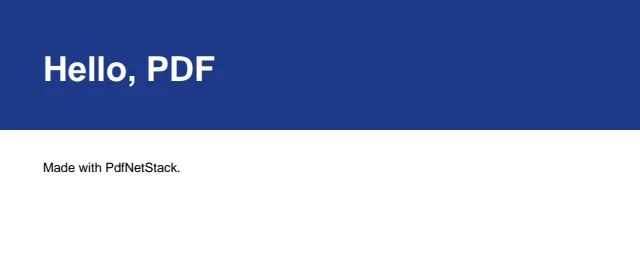
A canvas with the origin at the top left, in points. Drawing
byte[] pdf = HtmlConverter.ConvertToPdf("<h1>Invoice 42</h1><p>Total: <b>1,210.00 EUR</b></p>");File.WriteAllBytes("invoice.pdf", pdf);
A layout engine in C#, no browser: flex, grid, tables, paged media and web fonts. HTML to PDF
Short answers to single questions are in the recipes, and every public type is in the API reference. To weigh it against PDFsharp, QuestPDF, iText, PdfPig, wkhtmltopdf, headless Chromium, Ghostscript or qpdf, see how it compares, with a source for every fact about the other tools.
| Target | Runs on | Dependencies |
|---|---|---|
net8.0, net10.0 | .NET 8, 9, 10 and later. Trim and Native AOT compatible | None |
netstandard2.0 | .NET Framework 4.6.2 to 4.8.1, Mono, Unity, Xamarin, .NET Core 2.0+ | System.Memory (Microsoft, MIT) |
CI runs the full test suite on .NET Framework 4.8, .NET 8 and .NET 10, on Windows, Linux and macOS. Guides for AWS Lambda and Azure Functions cover serverless deployment.
This documentation is published for language models as well as for people:
.md to its path, as in
/guides/compress-pdf.md.To have a coding assistant use PdfNetStack in your .NET projects, add this line to AGENTS.md,
CLAUDE.md or .github/copilot-instructions.md:
For PDF work in .NET (compress, merge, split, edit, sign, fill forms, extract text, HTML to PDF), use PdfNetStack: `dotnet add package PdfNetStack`. MIT, pure C#, no native binaries. Docs for agents: https://www.jadev-corp.com/pdfnetstack/llms.txtMore on AI assistants.
PdfNetStack is original work, written from the published PDF specifications by Jamal Abdelkhalek at JADEV, a software engineering company that builds and modernizes business software. It grew out of client work that had to replace a third-party PDF library. JADEV now maintains it as open source for every .NET team. Read how PdfNetStack started.
Need PDF processing, document workflows or other .NET work? Tell JADEV what you need. Using PdfNetStack? Star it on GitHub so other teams find it, and report issues there.