
Fonts and text in PDF with C# and .NET
Text on PDF pages: the standard fonts, embedded TrueType and OpenType fonts, wrapped and justified paragraphs, and right to left scripts.
Short answer
Section titled “Short answer”DrawString writes one line of text at a baseline. PdfStandardFont gives the 14 fonts every PDF
viewer has, with nothing to embed. PdfOpenTypeFont.Load reads a .ttf, .otf, .ttc, .woff or
.woff2 file and embeds only the glyphs you draw.
// The 14 standard fonts need no embedding: every PDF viewer has them.PdfFont bold = PdfStandardFont.HelveticaBold;g.DrawString("Invoice 2026-114", bold, 24, PdfColor.Black, 40, 60);   // x, then the baseline y
// Measure to align: right edge at 555 points.double width = bold.MeasureString("Total: €1,250.00", 14);g.DrawString("Total: €1,250.00", bold, 14, PdfColor.Black, 555 - width, 60);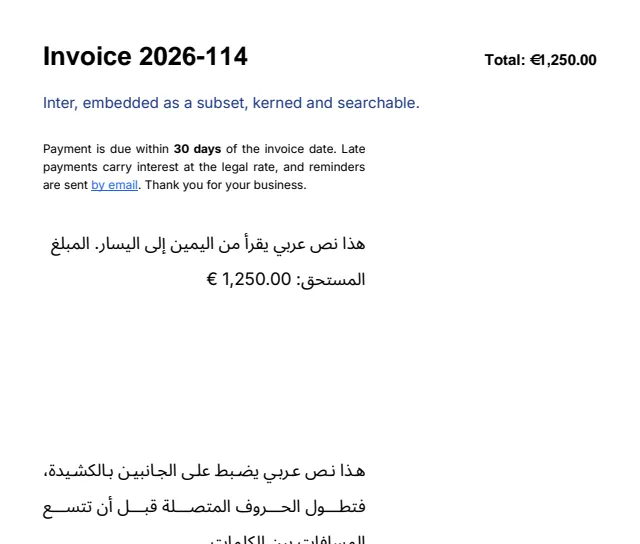
One line of text
Section titled “One line of text”DrawString(text, font, size, brush, x, y) places the start of the baseline at (x, y). To place
the top of the line instead, add font.Ascent * size to y. Another overload takes a pen and a
brush, so glyphs can be filled with a gradient, outlined, or both.
MeasureString(text, size) returns the width in points, which is all you need to right align or
center a line. Font metrics are fractions of the font size: multiply by the size to get points.
| Member | Meaning |
|---|---|
Ascent, Descent | Height above and depth below the baseline used for line spacing (descent is positive) |
LineGap, GetLineHeight(size) | Recommended extra space, and the default line height in points |
CapHeight, XHeight | Height of flat capitals and of flat lowercase letters |
UnderlinePosition, UnderlineThickness | Where an underline sits |
StrikeoutPosition, StrikeoutThickness | Where a strikethrough sits |
HasGlyph(codePoint), CanRender(text) | Whether the font can draw a character or a string |
The 14 standard fonts
Section titled “The 14 standard fonts”PdfStandardFont has Helvetica, Times and Courier with their bold and italic styles, Symbol and
ZapfDingbats. Viewers supply them, so nothing is embedded.
- Latin text uses WinAnsiEncoding (Windows-1252). Up to 37 further characters per font and document, such as Central European letters and the minus sign, get codes through a /Differences array.
- Symbol and ZapfDingbats take their own Unicode characters.
- A character the font cannot draw throws an
ArgumentException. For other scripts, embed a font.
Embedded fonts
Section titled “Embedded fonts”// Any TrueType or OpenType font: .ttf, .otf, .ttc, .woff or .woff2. Only the glyphs drawn are embedded.PdfFont inter = PdfOpenTypeFont.Load("fonts/Inter-Regular.woff2");g.DrawString("Inter, embedded as a subset, kerned and searchable.", inter, 14, PdfColor.FromHex("#1E3A8A"), 40, 100);- TrueType and OpenType (CFF) fonts load from .ttf, .otf, .ttc and .otc collections, WOFF and
WOFF2. For a collection, pass the index of the font;
CountFontssays how many it holds. - Drawn text embeds a subset of the glyphs used, as a Type 0 font with a ToUnicode map, so the text stays searchable and copyable.
- Pairs are kerned from the font’s GPOS or kern table.
- A font is written into a document the first time text is drawn with it, once per document. One
PdfFontinstance serves every size and can be shared between documents and threads. - A font whose license forbids embedding (the OS/2 fsType flags) is refused when first drawn. A
damaged file raises
FontFormatException.
Variable fonts
Section titled “Variable fonts”A variable font holds a range of styles along design axes such as weight (wght) or width
(wdth). Drawn as loaded, it shows its default instance. IsVariable, VariationAxes and
NamedInstances describe it:
var font = PdfOpenTypeFont.Load("fonts/Variable.ttf");Console.WriteLine($"Variable: {font.IsVariable}");foreach (PdfFontAxis axis in font.VariationAxes){ Console.WriteLine($"{axis.Tag} ({axis.Name}): {axis.Minimum} to {axis.Maximum}, default {axis.Default}");}Console.WriteLine($"Named instances: {string.Join(", ", font.NamedInstances)}");GetInstance(name) gives a named instance, such as “Bold”, and GetInstance(axisValues) any
point in the design space. Axes left out keep their default, and values outside an axis’s range
are clamped to it. Each instance is a PdfOpenTypeFont embedded as a static font, subset like any
other.
PdfOpenTypeFont thin = font.GetInstance("Thin");PdfOpenTypeFont bold = font.GetInstance("Bold");PdfOpenTypeFont custom = font.GetInstance(new Dictionary<string, double> { ["wght"] = 550 });
g.DrawString("HOT TO", thin, 40, PdfColor.Black, 40, 70);g.DrawString("HOT TO", font, 40, PdfColor.Black, 40, 130);      // the default instanceg.DrawString("HOT TO", custom, 40, PdfColor.Black, 40, 190);g.DrawString("HOT TO", bold, 40, PdfColor.Black, 40, 250);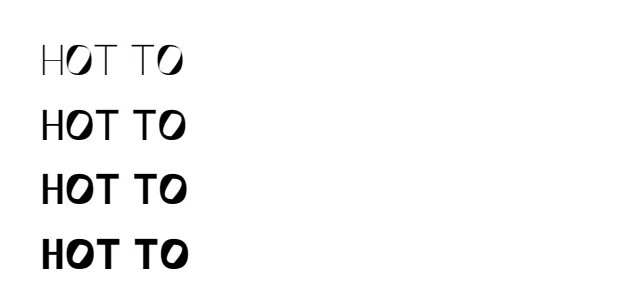
- TrueType outlines move by their gvar deltas, advances come from HVAR, font metrics from MVAR, and control values from cvar, through the avar mapping. The weight and width classes and the italic angle follow the axes.
- CFF2 fonts load at their default instance and are converted to CID keyed CFF for embedding; instances apply their blends.
- Shaping applies the variation deltas of kerning and mark positions, and GSUB and GPOS feature variations, so an instance can swap glyphs.
- Outlines, advances and metrics match the fontTools instancer, and shaping matches HarfBuzz, on
the synthetic fixtures and variable fonts the test suite compares. Damaged variation data raises
FontFormatException.
Font collections
Section titled “Font collections”PdfFontCollection finds fonts by family, weight and style the way CSS matches them. Adding a file
or a directory reads only the font’s names and style; the font itself loads when first found.
PdfFontCollection.System holds the fonts installed on the machine.
var fonts = new PdfFontCollection();fonts.AddDirectory("fonts"); // reads names and styles onlyPdfFont? found = fonts.Find("Inter", weight: 700); // null when the family is unknownPdfFont interBold = found ?? PdfStandardFont.HelveticaBold;PdfFont arabic = fonts.Find("Noto Sans Arabic") ?? throw new InvalidOperationException("Font missing");Find(family, weight, italic) takes a CSS weight from 1 to 1000 (400 regular, 700 bold) and
returns the closest face, or null when the family is unknown. The collection is thread safe.
Paragraphs
Section titled “Paragraphs”PdfParagraph holds rich text: spans, each with its own PdfTextStyle. DrawText lays the
paragraph out at a width, wraps and aligns its lines, and draws it with its top left corner at
(x, y). It returns the PdfTextLayout, whose Height tells how much room it took.
var body = new PdfTextStyle(inter, 11);var paragraph = new PdfParagraph { Alignment = PdfTextAlignment.Justify, LineHeight = 1.5 } .Add("Payment is due within ", body) .Add("30 days", body with { Font = interBold }) .Add(" of the invoice date. Late payments carry interest at the legal rate, and reminders are sent ", body) .Add("by email", body with { Underline = true, Brush = PdfColor.FromHex("#2563EB") }) .Add(". Thank you for your business.", body);PdfTextLayout layout = g.DrawText(paragraph, 40, 130, 300); // top left corner and widthPdfParagraph | Default | Notes |
|---|---|---|
Alignment | Start | Start, End, Left, Right, Center or Justify (the last line aligns to the start) |
Direction | Auto | From the first strong character, or LeftToRight, RightToLeft |
LineHeight | null | A multiple of each span’s font size, as CSS line-height takes a number; null uses the font’s own spacing |
FirstLineIndent | 0 | In points |
PdfTextStyle | Default | Notes |
|---|---|---|
Font, Size | Required | |
Brush | black | Fill of the glyphs and decorations; null for outlines only |
Pen | null | Outline of the glyphs |
Fallbacks | none | Fonts tried in order for characters Font lacks |
LetterSpacing, WordSpacing | 0 | Extra space in points |
Underline, Strikethrough | false | Decorations |
PdfTextStyle is a record, so body with { Font = interBold } derives a variant.
Lines break at Unicode line break opportunities (UAX #14). A word wider than the line breaks between characters. Line feeds start a new line, tabs advance four spaces, and soft hyphens (U+00AD) show a hyphen when a word breaks there.
Hyphenation
Section titled “Hyphenation”Hyphenation is off by default. Give a paragraph a PdfHyphenator and words break at the line’s end
where the language allows, with a hyphen. The core library has Liang’s algorithm, as TeX defines
it, and no patterns; the optional PdfNetStack.Hyphenation package has them.
// Opt in per paragraph. A language loads on first use; the hyphenator is shared and thread safe.var german = new PdfParagraph { Alignment = PdfTextAlignment.Justify, Hyphenator = PdfHyphenationPatterns.ForLanguage("de") } .Add("Die Rechtschreibung regelt die Silbentrennung, auch im Bundesverfassungsgericht.", new PdfTextStyle(PdfStandardFont.Helvetica, 11));g.DrawText(german, 50, 60, 160);| Tag | Language | Tag | Language |
|---|---|---|---|
en-us (also en, en-CA) | English, American | en-gb (also en-AU, en-NZ, en-IE, en-ZA, en-IN) | English, British |
de (also de-AT, de-CH) | German, reformed spelling | fr | French |
nl | Dutch | es | Spanish |
it | Italian | pt (also pt-BR, pt-PT) | Portuguese |
af | Afrikaans | be | Belarusian |
bg | Bulgarian | cy | Welsh |
da | Danish | el (el-monoton), el-polyton | Greek |
et | Estonian | eu | Basque |
ga | Irish | gl | Galician |
hr | Croatian | la | Latin |
lt | Lithuanian | nb (also no), nn | Norwegian |
pl | Polish | sk | Slovak |
sl | Slovene | sq | Albanian |
uk | Ukrainian |
Patterns come from TeX’s hyph-utf8. Only sets with a
permissive license ship, so some languages have no patterns: ca, cs, eo, fi, hu, hy, id,
is, lv, mk, ro, ru, sr, sv, th and tr, with German in the 1901 spelling
(de-1901), which has its own breaks. ForLanguage returns null for those. If you are licensed to
use other patterns, PdfHyphenator.Create takes them in TeX’s format.
Each set brings the minimum letters before and after a hyphen its source gives. MinWordLength is 5
by default. Words the patterns get wrong, or that must never break, go in as exceptions:
// Tune the limits, and add your own words: a word without a hyphen never breaks.PdfHyphenator english = PdfHyphenationPatterns.ForLanguage("en-GB")!.WithExceptions(["PdfNetStack", "ta-ble"]) with { MinWordLength = 6, MinLeft = 3 };string marked = english.InsertSoftHyphens("Characterisation of programmes"); // soft hyphens at each pointConsole.WriteLine(string.Join("|", english.FindBreaks("Characterisation")));Left alone: words with a soft hyphen, whose breaks are the author’s; words joined to a digit, or
holding a capital past the first letter; words of all capitals, unless HyphenateAllCaps; web and
e-mail addresses and paths; words over 64 letters. Results do not depend on the current culture.
PdfParagraph.Text keeps words whole, and extracted text marks a shown hyphen with U+00AD. In HTML,
see hyphens: auto.
Right to left and Arabic
Section titled “Right to left and Arabic”Text runs through the Unicode bidirectional algorithm (UAX #9) and an OpenType shaper: Arabic and Persian letters join and take their contextual forms, ligatures form, vowel marks sit on their letters, and mixed right to left and left to right text is ordered with mirrored brackets. The line breaking and bidi implementations pass the Unicode 16 conformance suites, and the shaper matches HarfBuzz on the fonts the test suite compares.
var arabicStyle = new PdfTextStyle(arabic, 16) { Fallbacks = [inter] }; // digits and € come from Intervar rtl = new PdfParagraph { Direction = PdfTextDirection.RightToLeft } .Add("هذا نص عربي يقرأ من اليمين إلى اليسار. المبلغ المستحق: 1,250.00 €", arabicStyle);g.DrawText(rtl, 40, 140 + layout.Height + 20, 300); // start aligned: on the rightIn a right to left paragraph, Start alignment means the right edge. Shaped and right to left
text carries ActualText, so it copies and searches in logical order.
Kashida justification
Section titled “Kashida justification”With Kashida = true and Justify alignment, justified Arabic lines elongate joined letters
with tatweel before the spaces widen: one elongation per word, up to three tatweel widths, at the
point Arabic typography prefers. Tatweels carry no text, so copying gives the original words. A
font without a tatweel glyph justifies with spaces only. It is off by default.
// Justified Arabic lines elongate one join per word with tatweel before spaces widen.var justified = new PdfParagraph { Direction = PdfTextDirection.RightToLeft, Alignment = PdfTextAlignment.Justify, Kashida = true } .Add("هذا نص عربي يضبط على الجانبين بالكشيدة، فتطول الحروف المتصلة قبل أن تتسع المسافات بين الكلمات.", arabicStyle);g.DrawText(justified, 40, 420, 300);Indic scripts
Section titled “Indic scripts”Devanagari, Bengali, Gurmukhi, Gujarati, Oriya, Tamil, Telugu, Kannada and Malayalam are shaped
per Microsoft’s script development specifications: syllables are found, the base consonant, reph
and pre-base matras reorder, the font’s basic and presentation forms apply in order, and broken
clusters get a dotted circle. Fonts built to the old (deva) and the new (dev2) specification both
work. The shaper matches HarfBuzz on a synthetic Devanagari and Bengali fixture and on a font
covering all nine scripts. Draw with a font that covers the script, through DrawString, DrawText or a fallback in PdfTextStyle.Fallbacks.
Unicode normalization
Section titled “Unicode normalization”The shaper normalizes text as HarfBuzz does. A character the font lacks is decomposed into ones it
has, marks are sorted into canonical order, and a base and a mark are composed when the font has the
composite glyph. Spaces and the non-breaking hyphen draw with the space and hyphen glyphs when the
font has no glyph of their own. CanRender, font fallback and HTML text use the same coverage
rules, so “é” typed as e plus a combining accent draws in a font that only has the precomposed
letter.
Text that continues on the next page
Section titled “Text that continues on the next page”PdfTextLayout.Create measures a paragraph without drawing it. Each line reports its Top,
Baseline and Height, so you can decide how many lines fit, then draw a range of lines with
DrawText(layout, x, y, first, count) and continue on the next page.
var style = new PdfTextStyle(PdfStandardFont.TimesRoman, 12);var paragraph = new PdfParagraph { Alignment = PdfTextAlignment.Justify }.Add(text, style);PdfTextLayout layout = PdfTextLayout.Create(paragraph, 595 - 2 * 72);   // measure before drawing
PdfDocument doc = PdfDocument.Create();const double top = 72, bottom = 842 - 72;int next = 0;while (next < layout.Lines.Count){    // As many lines as fit between the margins, measured from the first line of this page.    double pageTop = layout.Lines[next].Top;    int count = 0;    while (next + count < layout.Lines.Count        && layout.Lines[next + count].Top + layout.Lines[next + count].Height - pageTop <= bottom - top)    {        count++;    }
    PdfPage page = doc.Pages.Add(PdfRectangle.A4);    using PdfGraphics g = page.CreateGraphics();    g.DrawText(layout, 72, top, next, count);    next += count;}doc.Save("flow.pdf");Console.WriteLine($"{layout.Lines.Count} lines on {doc.Pages.Count} pages");
Limits
Section titled “Limits”PdfFontCollectionand HTML do not choose variable font instances yet: they draw a variable font at its default instance. UseGetInstancefor other styles.- Southeast Asian scripts (the Universal Shaping Engine), Khmer, Myanmar, Thai and Hangul shapers are on the roadmap. Lines are filled greedily.
- A hyphenation point inside a ligature is skipped, since breaking there would need the word shaped
again. Fonts without a hyphen glyph do not hyphenate. One hyphenator serves a whole paragraph;
for mixed languages, use
InsertSoftHyphensspan by span. - Standard fonts cover Windows-1252 plus up to 37 further characters per font and document.
Related
Section titled “Related”- Drawing
- HTML to PDF: CSS layout with
@font-faceand web fonts - PDF/A: archival output needs embedded fonts
- API: PdfFont, PdfStandardFont, PdfOpenTypeFont, PdfFontAxis, PdfFontCollection, PdfParagraph, PdfTextStyle, PdfTextLayout
Questions
- Is text drawn by PdfNetStack searchable?
- Yes. Embedded fonts get a ToUnicode map, so text selects, copies and searches in any script the font covers. Shaped and right to left text also carries ActualText, so it copies in logical order.
- Does embedding a font make the file large?
- No. Only the glyphs you draw are embedded, as a subset. The 14 standard fonts are not embedded at all, so a page of text in them weighs about 2 KB.
- Can I write Arabic, Hebrew or Hindi?
- Yes. Text runs through the Unicode bidirectional algorithm and an OpenType shaper with Arabic and Indic shaping, so Arabic letters join, Devanagari syllables reorder and mixed directions are ordered. Use a font that has the script's glyphs.
- Are variable fonts supported?
- Yes. PdfOpenTypeFont.GetInstance gives a named instance or any axis values of a TrueType or CFF2 variable font, embedded as a static font.