
Get started with PdfNetStack
Install the package, run one call, and you have a smaller PDF that is proven equivalent to the original.
Short answer
Section titled “Short answer”Add the PdfNetStack package and call the optimizer. That is the whole setup: no native
binaries, no Ghostscript, nothing else to install.
dotnet add package PdfNetStack#:package PdfNetStack@1.2.0using PdfNetStack;
PdfOptimizationResult result = await PdfOptimizer.OptimizeFileAsync("manual.pdf", "manual.optimized.pdf");Console.WriteLine($"{result.Disposition}: {result.OriginalBytes:N0} to {result.OutputBytes:N0} bytes, saved {result.SavingPercent:F1}%");Console.WriteLine(result.Reason);With the .NET 10 SDK you can also save the code above as compress.cs and run it with
dotnet run compress.cs: the #:package line pulls the package in.
Requirements
Section titled “Requirements”| Target | Runs on | Dependencies |
|---|---|---|
net8.0, net10.0 | .NET 8, 9, 10 and later. Trim and Native AOT compatible | None |
netstandard2.0 | .NET Framework 4.6.2 to 4.8.1, Mono, Unity, Xamarin, .NET Core 2.0+ | System.Memory (Microsoft, MIT) |
The same managed code runs on Windows, Linux and macOS. CI runs the test suite on .NET Framework
4.8, .NET 8 and .NET 10. One difference: .NET Standard’s zlib has no level 9, so
CompressionEffort.Maximum compresses a little less there.
Packages
Section titled “Packages”| Package | What it is | On NuGet |
|---|---|---|
PdfNetStack | The library | 1.2.0 |
PdfNetStack.Tool | The pdfnetstack command line tool | 1.2.0 |
PdfNetStack.Html | HTML and CSS to PDF | 1.2.0 |
PdfNetStack.Hyphenation | Hyphenation patterns for paragraphs and hyphens: auto | 1.2.0 |
PdfNetStack.Ocr | OCR add-on for scanned PDFs | 1.2.0 |
PdfNetStack.Ocr.Tesseract | OCR through a tesseract you installed | 1.2.0 |
PdfNetStack.Ocr.Models | The OCR models, versioned on their own | 1.0.0 |
PdfNetStack.Ocr.Tool | The pdfnetstack-ocr command line tool, models included | 1.2.0 |
dotnet add package PdfNetStack # librarydotnet tool install -g PdfNetStack.Tool # command line: pdfnetstackYour first edit
Section titled “Your first edit”Open a document, change its pages, save it. Saving runs the optimizer and its verification by default, so edited files come out compact.
PdfDocument doc = PdfDocument.Open("contract.pdf");doc.Pages.RemoveAt(0); // drop the coverdoc.Pages.Import(PdfDocument.Open("annex.pdf").Pages); // append another documentdoc.Info.Title = "Contract with annex";doc.Save("contract-final.pdf"); // optimized and verified by defaultMore in Edit pages.
Your first new PDF
Section titled “Your first new PDF”Version 1.1 adds a drawing canvas. The origin is the top left corner of the page and units are points.
PdfDocument doc = PdfDocument.Create();PdfPage page = doc.Pages.Add(PdfRectangle.A4);using (PdfGraphics g = page.CreateGraphics()) // origin top left, y down, points{ g.DrawRectangle(null, PdfColor.FromHex("#1E3A8A"), 0, 0, page.Width, 120); g.DrawString("Hello, PDF", PdfStandardFont.HelveticaBold, 32, PdfColor.White, 40, 75); g.DrawString("Made with PdfNetStack.", PdfStandardFont.Helvetica, 12, PdfColor.Black, 40, 160);}doc.Save("hello.pdf");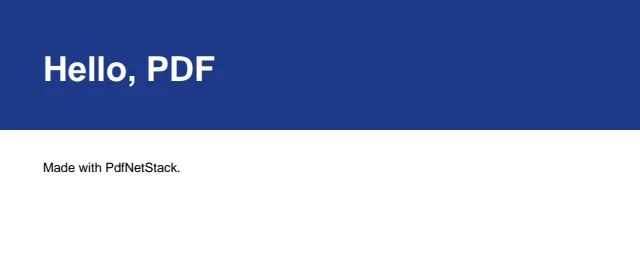
More in Drawing and Fonts and text.
Build from source
Section titled “Build from source”Every feature on this site is in the 1.2 packages on NuGet. To try what is in the main branch before the next release, build against a clone of the repository. You need the .NET 10 SDK.
git clone https://github.com/jams4code/pdf.netstackdotnet build pdf.netstack/PdfNetStack.sln -c ReleaseIn a .NET 10 file-based app, reference the project instead of the package, here for a clone in the same folder as the file:
#:project pdf.netstack/src/PdfNetStack/PdfNetStack.csprojIn a project file, use a project reference, here for a clone next to the project folder:
<ItemGroup> <ProjectReference Include="..\pdf.netstack\src\PdfNetStack\PdfNetStack.csproj" /> <!-- HTML to PDF --> <ProjectReference Include="..\pdf.netstack\src\PdfNetStack.Html\PdfNetStack.Html.csproj" /></ItemGroup>Unreleased API can still change before its release. The changelog lists every change by version.
How the samples on this site run
Section titled “How the samples on this site run”Every C# sample on this site is a file in the repository’s website/samples folder. CI compiles
and runs each of them against the source the site was built from, checks that every PDF it writes
opens again, and renders the images you see from those PDFs. The OCR samples are compiled only,
because they need model files CI does not download.
Next steps
Section titled “Next steps”- Compress PDF: options, results and what the optimizer refuses
- Command line: the same features from a terminal
- Recipes: short answers to single tasks
- API reference: every public type
Questions
- Is PdfNetStack free for commercial use?
- Yes. It is MIT licensed, and on .NET 8 and later the core package has no dependencies. On .NET Standard 2.0 it uses Microsoft's System.Memory, also MIT.
- Which .NET versions does PdfNetStack support?
- .NET 8, 9, 10 and later through the net8.0 and net10.0 targets, and .NET Framework 4.6.2 to 4.8.1, Mono and Unity through netstandard2.0.