
HTML to PDF in C# without a browser
PdfNetStack.Html turns HTML and CSS into PDF with a layout engine written in C#: no browser, no
native binaries, no JavaScript.
Short answer
Section titled “Short answer”Call HtmlConverter.ConvertToPdf with an HTML string to get the PDF bytes. The markup is parsed
the way browsers repair it, styled with the CSS cascade, laid out in boxes and split into pages
by the paged media rules.
byte[] pdf = HtmlConverter.ConvertToPdf("<h1>Invoice 42</h1><p>Total: <b>1,210.00 EUR</b></p>");File.WriteAllBytes("invoice.pdf", pdf);The package is PdfNetStack.Html. It depends on the PdfNetStack version it ships with, and runs
on .NET 8 and later and on .NET Framework 4.6.2 and later through .NET Standard 2.0.
Convert a file with its assets
Section titled “Convert a file with its assets”ConvertFileToDocument reads an HTML file and resolves relative URLs against its folder, so style
sheets, images and fonts next to the template load. Files outside that folder do not.
// Relative URLs (fonts, logo) resolve against the file's folder, and only that folder is read.PdfDocument doc = HtmlConverter.ConvertFileToDocument("invoice.html");doc.Save("invoice.pdf");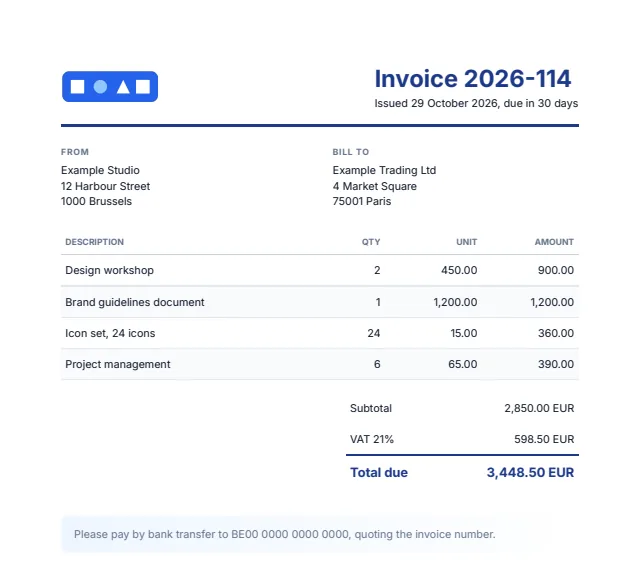
The template behind this invoice uses @font-face with WOFF2 files, custom properties, flexbox,
grid, a table with striped rows and a gradient. Its <title>, <meta name="author"> and
lang attribute become the PDF title, author and language.
Three entry points
Section titled “Three entry points”| Method | Input | Output |
|---|---|---|
ConvertToPdf(html, options) | An HTML string | The PDF as a byte array |
ConvertToPdf(html, stream, options) | An HTML string | The PDF written to a stream |
ConvertToDocument(html, options) | An HTML string | A PdfDocument to change before saving |
ConvertFileToDocument(path, options) | An HTML file, read as UTF-8 unless it starts with a byte order mark | A PdfDocument, with the file’s folder as the base |
All of them take an optional HtmlConverterOptions.
Options
Section titled “Options”var fonts = new PdfFontCollection();fonts.AddDirectory("fonts"); // .ttf, .otf, .woff and .woff2 files
var options = new HtmlConverterOptions{ BaseUri = new Uri(Path.GetFullPath(".") + Path.DirectorySeparatorChar), // relative URLs and file access PageStyle = "size: A5; margin: 15mm", // applies before the document's @page rules StyleSheet = "body { font-family: Inter, sans-serif; font-size: 10pt }", // a house style Fonts = fonts, // looked up before installed fonts UseSystemFonts = false, // same output on every machine Bookmarks = true, // headings become bookmarks (default) Tagged = true, // structure tree for screen readers (default)};| Option | Default | Notes |
|---|---|---|
BaseUri | null | Where relative URLs point: a folder as a file URI, or a web address when ResourceLoader fetches from the network. ConvertFileToDocument sets it to the file’s location when you leave it null |
ResourceLoader | null | Fetches style sheets, images and fonts by absolute URL; returns null for anything that must not load. Without it only data: URIs and files under BaseUri’s folder load |
PageStyle | size: A4; margin: 2cm | Page size and margins as CSS, applied before the document’s own @page rules |
StyleSheet | null | A style sheet applied before the document’s own, for house styles |
Fonts | null | A PdfFontCollection searched before installed fonts |
UseSystemFonts | true | With false, output depends only on the HTML, the fonts you pass and the standard 14 fonts, and is the same on every machine |
Bookmarks | true | Headings become bookmarks, following the bookmark-level property |
Tagged | true | Writes a tagged PDF with a structure tree in reading order |
Resource loading and fonts are covered in Fonts and assets.
Work with the result
Section titled “Work with the result”ConvertToDocument returns a PdfDocument, so the rest of PdfNetStack applies before the file
is written: attach files, save as PDF/A, sign, encrypt, merge or stamp pages.
PdfDocument doc = HtmlConverter.ConvertToDocument(html, options);
// The result is a PdfDocument like any other: attach, sign, encrypt, merge or stamp it.doc.Info.Author = "Logistics";doc.Attachments.Add("delivery.xml", Encoding.UTF8.GetBytes("<delivery id=\"881\"/>"), "text/xml");doc.Save("delivery-note.pdf", new PdfSaveOptions { Conformance = PdfConformance.PdfA3U });
This sample writes a PDF/A-3u file with an XML attachment. PDF/A needs every font embedded, which
is why the options above pass Inter in Fonts and turn installed fonts off. See
PDF/A, Signatures and Edit pages.
To write straight to a stream, as an HTTP response or a blob upload would:
using (FileStream output = File.Create("delivery-note-plain.pdf")){ HtmlConverter.ConvertToPdf(html, output, options);}Accessible output
Section titled “Accessible output”By default the output is a tagged PDF (ISO 32000-1, 14.8). Headings, paragraphs, lists, tables
with header and data cells, figures with their alt text, links tied to their annotations,
sections and quotes form a structure tree in reading order. Backgrounds, borders, text shadows,
repeated table headers, fixed boxes and page margins are marked as artifacts, so screen readers
skip them. The catalog is marked and viewers show the document title. Set Tagged = false to
leave the structure out.
Links and bookmarks
Section titled “Links and bookmarks”Links to web addresses and to anchors in the same document become PDF links. Headings h1 to
h6 become nested bookmarks, from the bookmark-level property the default style sheet sets on
them; set Bookmarks = false to write none.
What it supports
Section titled “What it supports”- HTML. A tolerant parser that repairs markup as browsers do, and the legacy presentational
attributes old templates rely on (
align,bgcolor,width,cellpadding,cellspacing,border,font). - CSS. The cascade with
!important, inheritance,var(), Selectors Level 4,@media print,@import,@font-face,@page,calc(),min(),max(),clamp()and CSS Color 4. - Layout. Block, inline, table, flex and grid layout (with named lines, dense packing,
subgrid,auto-fillandauto-fit), floats, relative, absolute and fixed positioning inz-indexstacking order, inline blocks, lists, counters and generated content. - Paged media. Page sizes and margins, margin boxes, page counters, named pages, running headers and footers, forced and avoided breaks, repeated table headers. See Paged media.
- Text. Unicode line breaking, right to left and Arabic text with contextual shaping, Indic scripts, kerning, ligatures and fallback fonts per character.
The full list, module by module, is on CSS support.
Safe for untrusted HTML
Section titled “Safe for untrusted HTML”Without a ResourceLoader, nothing is fetched from the network and only files under the base
folder are read, so converting HTML from users cannot reach internal services or other files.
Parsing, styling and layout are bounded: nesting depth, selector complexity, var() expansion,
@import chains, table spans, grid tracks and background tiling all have limits, so hostile
markup ends in a finite document rather than a hang or a crash.
Limits
Section titled “Limits”- No JavaScript: pages must be rendered HTML, not built in the browser.
- No multi-column layout or vertical writing modes yet.
- Images: JPEG, PNG, GIF, BMP, TIFF and WebP (the first frame of animations), and SVG drawn as vectors without filters, masks or patterns.
- The
pageproperty takes no effect inside flex, grid and table containers. An inline running element shows on every page rather than from where it stands. - Variable fonts draw their default instance:
font-weightdoes not choose an instance yet. - Box shadow blur is approximated,
text-shadowblur is not drawn, and group opacity is applied per element.
Related
Section titled “Related”- Paged media: headers, footers, page numbers and breaks
- Fonts and assets:
@font-face, images and resource loading - CSS support: what is supported, module by module
- Fonts and text: the text engine underneath
- API: HtmlConverter, HtmlConverterOptions
Questions
- Does PdfNetStack.Html run a browser or JavaScript?
- No. It is a layout engine written in C# that parses HTML, applies CSS and lays out pages itself. Scripts are not run, so the HTML must already contain the content to print.
- Does HTML to PDF work on Linux and in containers?
- Yes. The package is managed code with no native binaries, so it runs wherever .NET runs. Set UseSystemFonts to false and supply fonts for output that is the same on every machine.
- Is the text in the PDF searchable?
- Yes. Text is written as real text with the fonts embedded or referenced, so it selects, copies and searches, and the output is a tagged PDF by default.